Is it possible share Mfa?
Quick Answer
Yes, it's technically possible to share MFA access, but traditional methods compromise security and accountability. Standard approaches like sharing SMS codes, QR codes for authenticator apps, or physical devices undermine MFA's core purpose of verifying individual identity. Secure alternatives like delegated access systems, role-based permissions, or purpose-built tools like Authn8 enable team access without exposing credentials or weakening security.
Multi-Factor Authentication (MFA) was designed with a fundamental assumption: one person, one identity. But the reality of modern work environments often contradicts this principle. Teams need to share access to company social media accounts, shared email addresses, legacy systems, and client accounts. This creates a dilemma how do you share access to MFA-protected accounts without undermining the security those protections provide?
The short answer is that while MFA sharing is possible, most traditional methods are insecure, violate compliance requirements, and create accountability nightmares. However, newer solutions designed specifically for this challenge make secure MFA sharing not just possible, but practical and safe.
Why MFA Sharing Is Challenging
The Identity Verification Paradox
MFA exists to prove "you are who you say you are" by requiring multiple independent factors. When you share MFA access, you fundamentally break this verification:
- If five people can use the same MFA token, the system can't verify which specific person is accessing the account
- Audit trails become meaningless when actions can't be attributed to individuals
- Security incidents become impossible to investigate without knowing who actually accessed the system
- Compliance frameworks like SOC 2, HIPAA, and PCI-DSS require individual accountability
Real-World Scenarios Requiring Shared Access
Despite the security concerns, organizations routinely face legitimate needs for shared access:
- Social media management: Marketing teams managing shared Facebook, Twitter, or LinkedIn business accounts
- Customer support: Multiple agents accessing shared ticketing or CRM systems
- Legacy systems: Older applications without role-based access that require account sharing
- Client accounts: Agencies managing clients' platforms on their behalf
- On-call rotations: Different engineers needing emergency access to production systems
- Service accounts: Automated systems or scripts that multiple team members maintain
Traditional MFA Sharing Methods (And Their Problems)
1. Sharing SMS Codes
How it works: One person receives the SMS code on their phone and verbally shares it with teammates or forwards the message.
Problems:
- Requires real-time communication doesn't work if the code receiver is unavailable
- Creates bottlenecks and workflow interruptions
- Codes expire quickly, causing frustration and delays
- No audit trail of who actually used the shared code
- Violates most security policies and compliance frameworks
2. Sharing Authenticator App QR Codes
How it works: During setup, multiple team members scan the same QR code with their individual authenticator apps. Each device then generates identical TOTP codes.
Problems:
- Exposes the secret key to everyone who scans the QR code
- If one team member leaves, you must reset MFA and redistribute to all remaining members
- No way to revoke access from a single person without affecting everyone
- Violates the "something you have" principle since multiple people have the same secret
- Creates security vulnerabilities if anyone's device is compromised
3. Sharing Physical Security Keys
How it works: Team members physically pass around a hardware security key (like a YubiKey) when access is needed.
Problems:
- Only one person can access the account at a time
- Logistical nightmare for distributed or remote teams
- Key can be lost, stolen, or damaged
- No accountability for who used the key when
- Doesn't work for urgent access when the key holder is unavailable
4. Shared Device Method
How it works: Keep a dedicated device (tablet, phone) with the authenticator app in a shared location like an office.
Problems:
- Completely breaks remote work capability
- Device can be stolen, providing access to all accounts
- No individual accountability anyone with physical access can use it
- Additional device to maintain, secure, and keep charged
- Fails security audits and compliance reviews
5. Password Manager Sharing
How it works: Store the MFA secret key or recovery codes in a shared password manager vault.
Problems:
- Many password managers don't support TOTP secret sharing
- Recovery codes are one-time use and quickly depleted
- Doesn't solve the accountability problem
- Still requires all users to access the same secret
Secure Alternatives to Traditional MFA Sharing
1. Platform-Native Team Access
Many platforms now offer built-in team management features that eliminate the need for sharing credentials:
- Social media: Facebook Business Manager, Twitter Teams, LinkedIn Page Admin roles
- Cloud services: AWS IAM roles, Google Cloud service accounts, Azure AD
- Business apps: Most modern SaaS tools offer multi-user access with individual logins
Advantages: Each team member has their own account, individual MFA, complete audit trails, and granular permissions.
Limitations: Only works for platforms that support it. Legacy systems, certain client accounts, and some services don't offer team access features.
2. Delegated Access and Single Sign-On (SSO)
Enterprise SSO solutions like Okta, Azure AD, or OneLogin can act as an authentication gateway, allowing individual identity verification while managing access to shared resources.
Advantages: Centralized control, individual accountability, MFA enforcement at the SSO level, easy provisioning and deprovisioning.
Limitations: Expensive for small teams, requires technical setup, only works with SSO-compatible applications.
3. Purpose-Built MFA Sharing Solutions
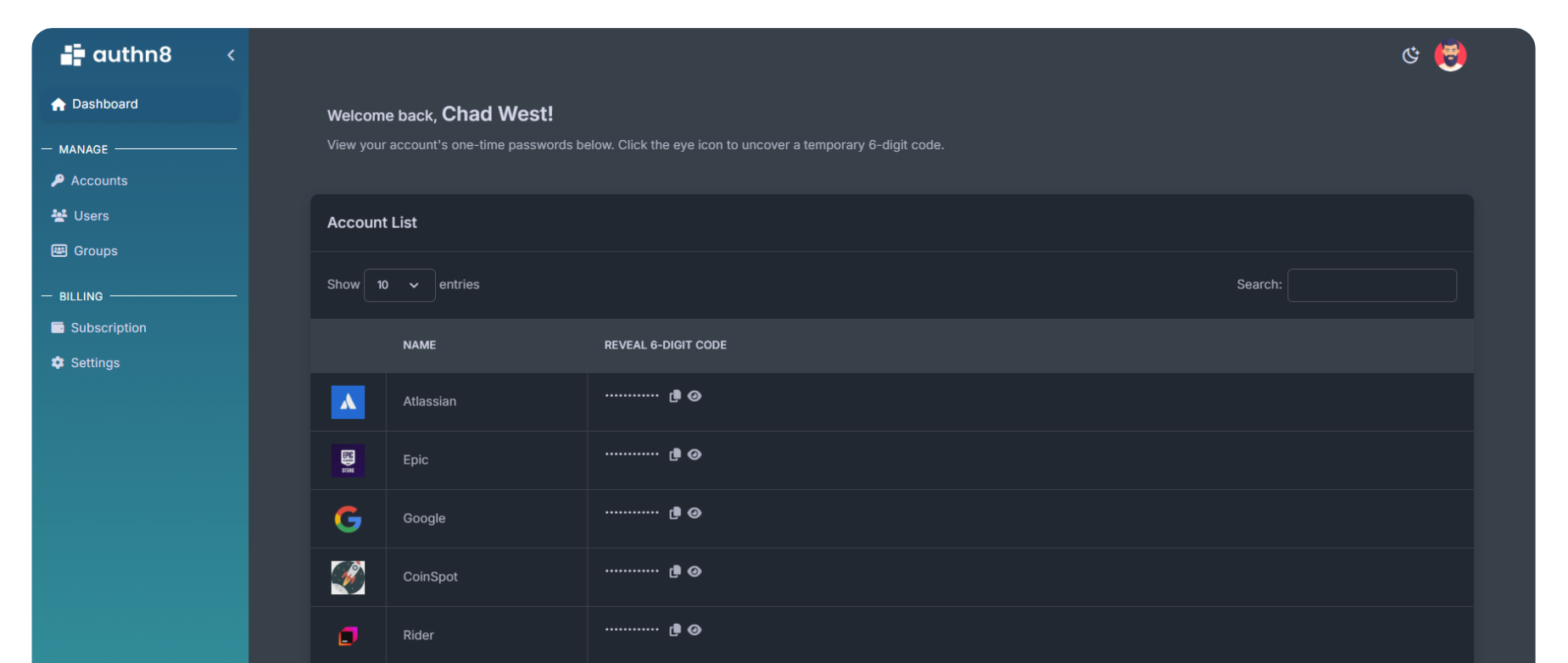
Tools like Authn8 are specifically designed to solve the MFA sharing problem for teams. These solutions provide:
- Individual accountability: Track exactly who accessed which account and when
- Granular permissions: Control which team members can access which accounts
- Secure secret management: Secrets never leave the system; users get TOTP codes without seeing the underlying secret
- Audit trails: Complete logs for compliance and security investigations
- Access revocation: Instantly remove access for departing team members without resetting MFA for everyone
- Zero exposure: Team members can authenticate without ever accessing raw credentials
Best Practices for MFA Sharing
When You Must Share MFA Access
If you're in a situation where MFA sharing is unavoidable, follow these principles to minimize risk:
- Use a dedicated solution: Never improvise with SMS forwarding or QR code screenshots. Use tools designed for secure sharing.
- Limit access: Only grant access to team members who genuinely need it. Follow the principle of least privilege.
- Maintain audit logs: Track who accesses what and when. Regular reviews help detect anomalies.
- Rotate credentials regularly: Change passwords and regenerate MFA secrets on a regular schedule.
- Implement time-based access: Grant temporary access that automatically expires rather than permanent sharing.
- Use backup codes wisely: Treat backup codes as emergency-only. Store them securely and track usage.
- Document everything: Maintain clear records of who has access to which accounts and why.
When to Avoid MFA Sharing
Some scenarios should never involve shared MFA:
- Financial accounts (banking, payment processors, cryptocurrency exchanges)
- Systems containing sensitive customer data (healthcare records, financial information)
- Production infrastructure with admin-level access
- Accounts subject to strict compliance requirements (SOC 2, HIPAA, PCI-DSS)
- Personal accounts of any kind
Compliance and Regulatory Considerations
Many regulatory frameworks explicitly prohibit shared credentials or require individual accountability:
- SOC 2: Requires unique user identification and individual accountability for all access
- HIPAA: Mandates unique user identification for systems containing protected health information
- PCI-DSS: Requires unique authentication credentials for anyone with access to cardholder data
- GDPR: Requires demonstrable accountability and ability to identify who accessed personal data
- ISO 27001: Mandates individual user accountability and access logging
If your organization is subject to any of these frameworks, traditional MFA sharing methods will likely fail audits. Purpose-built solutions that maintain individual accountability while enabling shared access are often the only compliant path forward.
Frequently Asked Questions
Is it legal to share MFA access?
It's not illegal in most jurisdictions, but it often violates terms of service for platforms and can breach compliance requirements if you're subject to frameworks like SOC 2, HIPAA, or PCI-DSS. More importantly, it creates security vulnerabilities and accountability gaps. Always check your organization's policies and applicable regulations before sharing MFA access.
Can I share Google Authenticator codes with my team?
Technically yes by having multiple people scan the same QR code during setup. However, this exposes the secret to everyone, eliminates individual accountability, and makes it impossible to revoke one person's access without resetting for everyone. It's not recommended. Instead, use platform-native team features or a purpose-built solution like Authn8 for sharing authenticator access.
What happens if someone leaves the company and we've shared MFA?
This is one of the biggest risks with traditional MFA sharing. If you've shared authenticator secrets or physical keys, the departing employee retains access until you reset the MFA which requires redistributing new secrets to all remaining team members. With proper solutions like SSO or Authn8, you simply revoke that individual's access without affecting anyone else.
Are there free solutions for sharing MFA access?
Platform-native team features (when available) are typically free or included in business plans. Some password managers include limited TOTP sharing features. For comprehensive, secure MFA sharing across any platform, purpose-built tools like Authn8 offer free tiers for small teams with paid options for enterprise features.
How do I convince my boss that we need a proper MFA sharing solution?
Focus on three key points: security risk (shared secrets can be compromised by any team member's device), compliance requirements (many frameworks prohibit shared credentials), and operational efficiency (proper solutions eliminate bottlenecks and enable immediate access revocation). Calculate the cost of a potential breach or failed audit versus the investment in a proper solution the math usually speaks for itself.
Conclusion
While sharing MFA access is technically possible, the traditional methods used by most teams introduce serious security vulnerabilities, compliance violations, and operational headaches. The good news is that modern solutions now make secure MFA sharing not just possible, but practical.
The ideal approach is to use platform-native team features whenever available, implement SSO for enterprise environments, and leverage purpose-built tools like Authn8 for scenarios where neither option works. What's no longer acceptable is improvising with SMS forwarding, QR code screenshots, or shared devices the risks far outweigh any perceived convenience.
If your team is currently sharing MFA access using any of the insecure traditional methods, now is the time to upgrade to a solution that preserves both security and collaboration. Your future auditors (and your security team) will thank you.
Team Sharing with Authn8
If you need to share MFA access with your team, Authn8 offers a secure solution. Unlike manually sharing codes or QR codes, Authn8 provides:
- Centralized management of shared 2FA codes
- Access control and permissions for team members
- Complete audit logs of who accessed which codes
- Secure sharing without exposing the original seed
- Web, mobile, and browser extension access
Want to see how our platform simplifies 2FA for teams and enterprises?
Get started today with our free plan and explore all the essential features at no cost.
Get Started